Image recognition in iRecord
Grace Skinner and Robin Hutchinson summarise recent work on integrating AI image recognition into the iRecord system.
Over the past couple of years, we’ve been working to integrate image recognition (AI) into iRecord, focusing on supporting species identification during record creation. We’ve approached this work cautiously as we recognise that there can be drawbacks as well as benefits to using AI, particularly around the accuracy of species identifications and more transparency for verifiers in how AI has been used by recorders. Therefore, we are working on improvements to the models themselves, how we deploy them, and how we monitor their performance. We have put together a series of FAQs on the how the AI is working within iRecord to update you on our current progress.
Which models are we using, and why?
We are running two models within iRecord app: Pl@ntNet (in the Plant List Survey) and Naturalis’ Nature Identification API (NIA). The Naturalis AI works on a series of interconnected models, the first of which identifies which taxonomic group is central in the photo. The photo is then sent to the relevant classifier for its group and likely identifications are returned with confidence scores. We then display the three results with the highest scores. Along with the probable species determinations, each model also returns its estimated probability that an image matches a given taxon. Whilst this probability does attempt to quantify the likelihood of matches, it is highly conditional on the model and the images it has been trained on, meaning that it can be risky to interpret this intuitively as the probability any given identification is correct. As with most AI species classifiers, the training datasets are highly imbalanced (e.g. some species have many training images; some species have very few image training images). To mitigate the potential risk of models being over-confident in identification, we therefore convert the model probabilities to red (0-39%), amber (40-69%), and green (70-100%) confidence scores.
We chose to use Pl@ntNet and the NIA model because they are specialised in species identification, are trained on millions of images, and are used by many recording platforms across Europe (including on apps such as ObsIdentify). There are other species classifiers in use (such as the iNaturalist classifier), but these are not available to integrate onto other platforms. We are also able to supply training data to Pl@ntNet and the NIA model to contribute to their improvement, based on accepted biological records and photographs with open licenses in Indicia (excluding iNaturalist and websites that do not share data with iRecord). Therefore, verified records are able to influence the model output. We supply images to the Naturalis team on an annual basis, therefore if records are redetermined, the model will be able to learn from this in the next training round. Because of this relationship, we are also supplied with a specialised model which outputs names that match the UK Species Inventory. This means that it can be easily integrated into UK-based recording platforms.
How are the models performing?
To understand how well the Naturalis Nature Identification classifier performs in practice, we carried out a large-scale evaluation of the classifier using more than 6.2 million images from accepted records from Indicia (including records from all websites sharing data with iRecord, verified before January 2026), representing almost 18,000 species across 75 taxonomic groups. Understanding where the classifier performs well (and where it struggles) will highlight where to focus future improvement.
Each image was processed by the classifier, and its species suggestions were compared with the verified identification on iRecord (at species level). We then calculated how often the correct species was the classifier's first suggestion ("top 1 accuracy"), as well as how often it appeared within the top two ("top 2 accuracy") or three ("top 3 accuracy") suggestions.
Overall, the classifier identified the correct species as its first suggestion for 83% of the images it was presented with, rising to 89% when considering its top three suggestions. These figures reflect performance on the images submitted to iRecord and should not be interpreted as applying uniformly across all UK taxonomic groups.
Taxonomic group accuracy
We also assessed how classifier performance varies between taxonomic groups. We summarised performance using two complementary measures: image classification accuracy, which reflects the accuracy users are likely to experience, considering the number of photos we typically receive for each species; and species classification accuracy, which gives equal importance to every species and provides a better indication of how consistently the classifier performs across both common and rare species.
Image classification accuracy
Image classification accuracy gives equal weight to every image. Common species therefore contribute more to the overall score than rare species, making the results broadly representative of the accuracy that users are likely to experience.
Performance varied considerably between taxonomic groups. The classifier correctly identified moths and butterflies on its first attempt in 92% and 87% of images, respectively, whereas accuracy was much lower for mosses (14%) and liverworts (10%) (Figure 1). This reflects both the inherent differences between taxonomic groups in how readily they can be identified from the types of photographs typically submitted to iRecord, and the imbalance between groups in how many photos were used to train classifiers.
Species classification accuracy
Species classification accuracy gives equal weight to every species, regardless of how many images are available. This means that rare (less frequently photographed) species have the same influence on the overall score as common species. Because rare species often have fewer training images available, they are generally more challenging for image classifiers to identify.
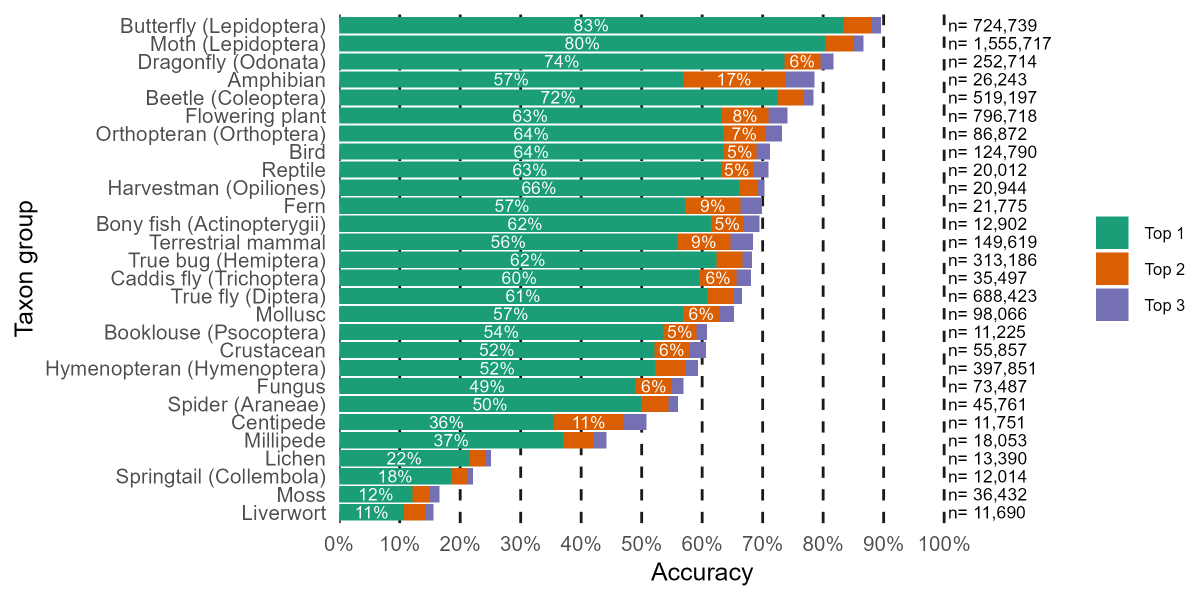
Species classification accuracy was consistently lower than image classification accuracy (Figure 2). For example, moths achieved an image classification accuracy of 92%, compared with a species classification accuracy of 80%, suggesting that the classifier performs less well for moth species represented by fewer images in the training data.
Evaluating whether the classifier is improving over time
A new version of the classifier is released each year. Comparing our results with a smaller evaluation carried out in 2022 shows clear improvements over time. Both image and species classification accuracy were higher in the 2026 evaluation than in the 2022 evaluation for the vast majority of taxonomic groups (Table 1). The reasons for these improvements cannot be determined from this evaluation alone, but they are likely to reflect a combination of advances in the underlying models, increases in the number of verified training images, and potentially changes in the quality of submitted images.
Additional findings
Additional analyses revealed several interesting patterns, consistent with expectations from machine learning and previous studies of AI-assisted biodiversity identification. Predictions with higher confidence scores were more likely to be correct, accuracy generally increased as more verified images were available for a species, and, in a case study of mayflies, caddisflies and stoneflies, the classifier performed much better on images of adults (80% top 1 accuracy) than juveniles (40% top 1 accuracy).
Table 1: Change in accuracy from 2022 to 2026 for selected taxon groups
Taxonomic group | Difference in image classification accuracy (%) | Difference in species classification accuracy (%) |
Amphibian | +20.6 | +12.0 |
Beetle (Coleoptera) | +23.8 | +36.2 |
Butterfly (Lepidoptera) | +11.4 | +16.7 |
Hymenoptera | +23.0 | +23.1 |
Moth (Lepidoptera) | +9.8 | +12.0 |
Reptile | +16.9 | +14.5 |
Terrestrial mammal | +31.7 | +23.0 |
Figure 1: Image classification accuracy per taxon group (equal weight given to every image – see text for details)
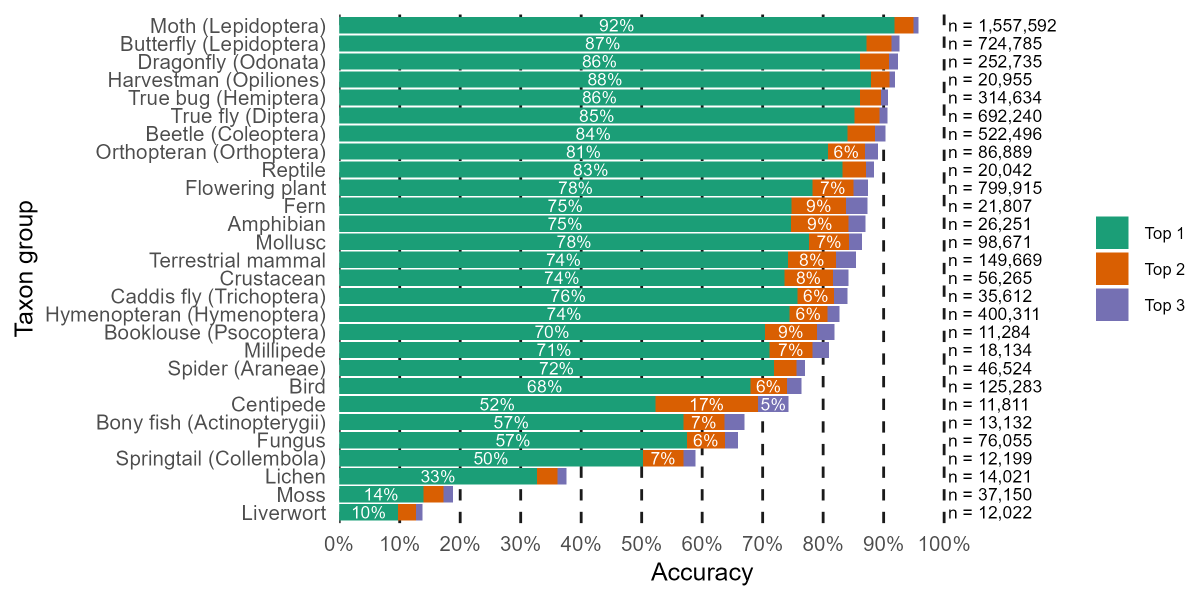
Figure 2: Species classification accuracy per taxon group (equal weight given to every species – see text for details)
What are the future plans?
Image classifiers have been integrated within a range of Indicia-based mobile apps, including iRecord and iRecord Butterflies. In March 2025, we started to log the suggestions of the image recognition software in the iRecord app. This allows us to monitor how frequently the classifier is running, whether the recorder selected the same taxa, and whether the verifier accepted, redetermined, or rejected the record. As we continue to collect this data, we will understand more about how people are interacting with the model, and what improvements we can make to the process. We are also working on quantifying the environmental impact of training and using AI, which we will update you on when we have more information.
In the short term, we are planning to allow verifiers to see the image classifier results on the verification pages, and whether the classifier agreed with the species selected by the recorder. This will be presented alongside the Record Cleaner checks (that indicate if a species is out of range, difficult to identify, or outside the usual flight period). This is not meant to replace verification (we are not using the models to verify any records). Instead, it will provide verifiers with another tool to understand the likelihood of a record being correct, and useful context on how a record was made.
In the longer term, we would like to incorporate ecological information into the predictions of the model and the presentation of the models’ suggestions in iRecord. We (and Naturalis) are currently working to define what this could look like (e.g. would the model be provided with ecological data to inform its suggestions, or would an ecological “sense-check” be applied after the suggestions are returned to the app?).
Can the AI be turned off?
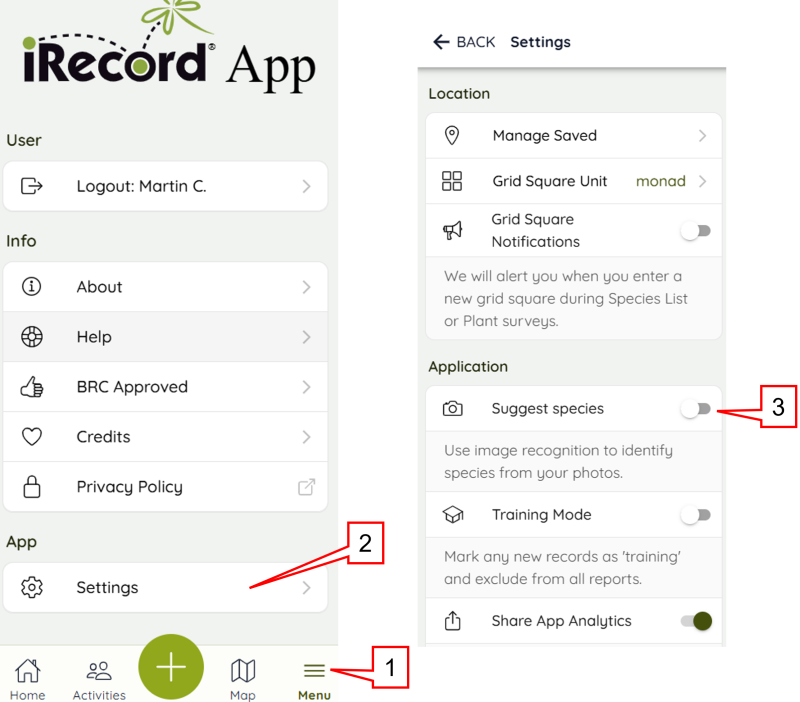
The iRecord app will still work without the image classifier, so if you prefer not to use it it can be turned off. Go to Menu (in the bottom righthand corner), then Settings. You will see a “Suggest species” option (see screenshots below) – turn this off and the image classifier will not be available to run on your photos. The classifier will also not run if you do not have a sufficiently strong phone signal. You can turn this back on at any time.